The store will not work correctly in the case when cookies are disabled.
We collect user information to provide a better user experience and protect the security of our website. By continuing to use our website, you acknowledge the use of cookies.
Observance of Labor day 09/07, Monday we are closed [No shippings and deliveries ], Orders received after 3.00pm CST on 09/04/2026 will be shipping out on Tuesday 09/08/2026.
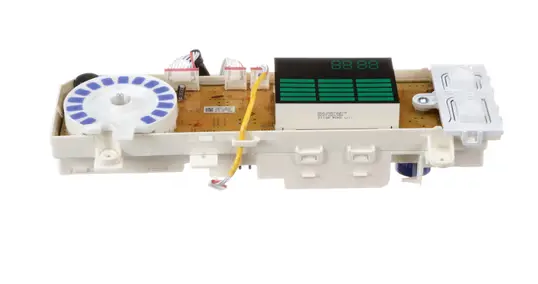
The Samsung DC92-02005A Washer User Interface Assembly Kit-Owm_Inv is installed on the front control panel of machines for users to operate and manage their washing cycles. The user interface assembly is the main control center, sending the user’s chosen commands to the washer’s internal system. Buttons and a display module are part of the component and they connect to the main control board to allow the machine to respond smoothly to user actions.
Step 1: The power cable should be disconnected from the wall outlet and the rear of the washer prior to starting the replacement.
Step 2: The screws situated at the rear of the appliance should be carefully extracted.
Step 3: The washer should be slowly elevated from its base, then the water hoses and drain line should be detached.
Step 4: The faulty component should be removed and the screws that secure it should be taken out.
Step 5: The new Samsung DC92-02005A ASSY KIT; OWM_INV, WA7700M, DD, 06 should be placed and the screws should be fastened.
Step 6: The water hoses, drain line, and power cable should be reconnected.
Step 7: The washer should be fixed back onto its base and the functionality of the new component should be verified.
These straightforward steps should be followed to replace your Samsung DC92-02005A ASSY KIT; OWM_INV, WA7700M, DD, 06. For optimal performance, authentic Samsung parts should be utilized for the replacement.
Please remember, these instructions should serve as a general reference and should always be followed alongside the manufacturer's manual, if it is available.