
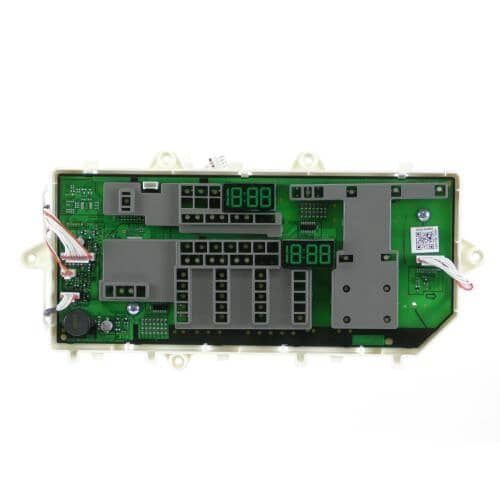
Samsung DC92-01995A Dryer Electronic Control Board & Display Assembly

Special Price $186.33 Regular Price $241.95
In stock
Available Quantity:   27
SKU
DC92-01995A

Product Description

The Samsung DC92-01995A Electronic Control Board & Display Assembly is used to control and manage various operations of the dryer. Work by handling inputs and the control of drying cycles. Receives signals from sensors, control temperature and time, and displays the cycle information on the digital panel. Provides the ability to control the drying process effectively, avoid over-drying, and achieve uniform drying.
Manufacturer

https://www.hnkparts.com/media/catalog/product/d/c/dc92-01995a_samsung_hnkparts.png

This Part Fits the Following Models (2)

Manufacturer Name: Samsung
Product Number: DC92-01995A
OEM Part Number: DC92-01995A
Product Description: Pcb-Display

Choose the best Home Appliance parts and supplies from HnKParts!

  • Same Day Shipping

  • Best Quality And Best Price

  • Wide Range of Inventory

  • Best Customer Service

Have More Questions or Need Help to Place The Order?
Reach us at (866)723-0907 or [email protected]

Write Your Own Review
You're reviewing:Samsung DC92-01995A Dryer Electronic Control Board & Display Assembly
Your Rating
Customer Questions
What maintenance is required for the Samsung DC92-01995A Electronic Control Board & Display Assembly?

Keep the control board area dry and free from dust buildup. Ensure proper ventilation to prevent overheating. Avoid power surges by using a surge protector. Disconnect power before inspection or handling to reduce electrical hazards.

What are common issues with the Samsung DC92-01995A Electronic Control Board & Display Assembly?

  • Unresponsive or blank display panel.
  • Dryer not starting or stopping unexpectedly.
  • Buttons not registering inputs.
  • Intermittent power or cycle control failures.

Installation Steps

Step1: Unplug dryer and shut off power/gas before servicing.

Step2: Remove top/back panel to access control board assembly.

Step3: Label and disconnect wiring harnesses carefully to avoid damage.

Step4: Remove mounting screws and faulty old board from bracket.

Step5: Install new board, secure screws firmly.

Step6: Reconnect wiring per labels, ensuring correct placement.

Step7: Reassemble panels and restore power, test cycle carefully.

Step8: Double-check all connections and ensure panel is secured.