The store will not work correctly in the case when cookies are disabled.
We collect user information to provide a better user experience and protect the security of our website. By continuing to use our website, you acknowledge the use of cookies.
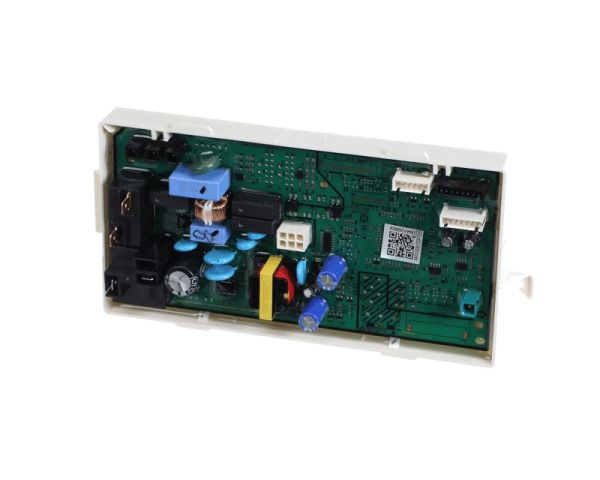
The Samsung DC92-01896G Dryer Electronic Control Board Holder Assembly maintains the functionality of appliances by providing protective housing for the control board. This component ensures smooth interaction between the dryer’s sensors and the electronic part to control temperature, cycles, and drying functions effectively. It is built to withstand damage, and designed to be stable to provide better performance and to avoid electrical mishaps that may cause the machine to stop drying clothes. It is protected from vibrations and other outside influences, functionality, and performance for an extended period.
Presents the designated mounting structure within the dryer control arrangement and supporting the board within its intended area. The Samsung DC92-01896G PCB Holder Assembly is an OEM replacement that maintains the defined board-holding structure and establishes the required physical arrangement around the PCB without describing its electrical operation or control functions.
Mounting Support:
Delivers the physical structure that accommodates the PCB assembly within the dryer control arrangement. The Samsung DC92-01896G Dryer PCB Holder Assembly forms the supporting holder around the board area, providing a defined mounting structure without describing the PCB’s electrical operation or control functions.
Control Board Positioning:
Establishes the defined placement of the PCB within the holder assembly, maintaining the board’s intended orientation relative to the surrounding structure. This positioning preserves the specified arrangement of the control board within its designated location without repeating the holder’s physical support function.
Replacement Guidelines:
Replacement of the Samsung DC92-01896G Dryer PCB Holder Assembly may be appropriate when the existing holder is cracked, broken, deformed, or otherwise damaged and no longer maintains the intended mounting structure for the PCB. Visible deterioration or loss of the holder’s defined form can indicate that the assembly requires replacement.
Common Failure Symptoms:
Cracks developing across the PCB holder structure.
Broken sections around the board mounting area.
Deformation affecting the holder’s defined shape.
Uneven positioning of the PCB within the holder.
Separation between the holder and surrounding structure.
Equipment Compatibility:
The Samsung DC92-01896G Dryer PCB Holder Assembly is intended for compatible Samsung dryers requiring the corresponding PCB holder assembly configuration. Verify the DC92-01896G dryer model, PCB holder configuration, assembly requirements, and manufacturer’s parts documentation before purchasing.
What maintenance is required for the Samsung DC92-01896G Electronic Control Board Holder Assembly?
Keep the holder area clean and free from lint buildup by wiping with a soft cloth. Ensure the board remains positioned evenly within the holder. Proper maintenance helps maintain stable control board support during dryer operation.
What are common issues with the Samsung DC92-01896G Electronic Control Board Holder Assembly?
Holder becomes loose inside the control housing.
Board vibration occurs during dryer operation.
Holder alignment changes during use.
Control board sits unevenly inside the housing.
What can happen if the PCB holder is cracked or deformed?
Damage to the holder can affect the physical positioning of the PCB and may prevent the board from remaining correctly supported within the dryer control area.
Can the PCB holder affect the position of the dryer control board?
Yes. The holder establishes the board’s physical placement, so deformation or damage can affect its intended position within the surrounding control structure.
Is the DC92-01896G a control board or a PCB holder?
The DC92-01896G is a PCB holder assembly. It provides the physical mounting structure for the dryer control board rather than performing the board’s electronic control functions.
Why is the PCB holder separate from the control board?
The holder and PCB serve different roles, the holder provides the physical support structure, while the PCB performs the applicable electronic control operations.
What should be matched before replacing DC92-01896G?
Match the complete Samsung dryer model and the DC92-01896G part number with the applicable manufacturer parts information to confirm the correct holder assembly.
Installation Steps
Step1: Unplug the dryer to ensure safety.
Step2: Remove the top or front panel to access the control board area.
Step3: Disconnect the wiring harness from the existing holder assembly.
Step4: Unscrew and remove the old control board holder assembly.
Step5: Install the new holder assembly and secure it with screws.
Step6: Reconnect the wiring harness, reattach the panels, restore power for proper operation.