The store will not work correctly in the case when cookies are disabled.
We collect user information to provide a better user experience and protect the security of our website. By continuing to use our website, you acknowledge the use of cookies.
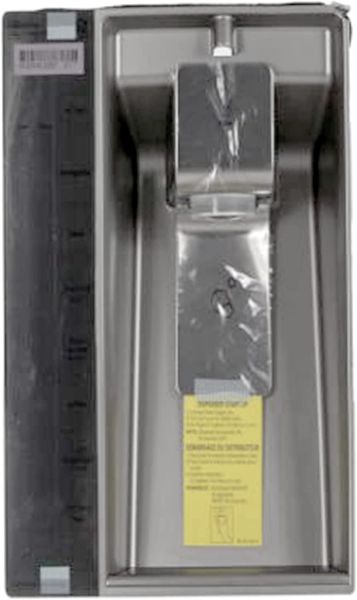
The LG ACQ85430297 Refrigerator Display Cover Assembly, effectively protects the display parts to provide precise readings and control of the temperature and settings, it is designed to improve the visibility and usability of the control panel. Its durability contributes to its effectiveness in performing its function and being used while retaining the appliance’s contemporary design, it is sturdy and protects internal electronics from dust, moisture, and other kinds of damage that can affect its performance in the long run.
Covers the designated display area on the refrigerator exterior, providing the physical cover assembly associated with the display section. The LG ACQ85430297 Display Cover Assembly is an OEM replacement that forms the specified covering structure around the display area while maintaining its defined exterior arrangement.
Display Protection:
Provides a protective barrier across the refrigerator display area, helping shield the display-facing section from direct external contact. Its primary role is to cover the exposed display surface and maintain a defined protective layer between the display area and the surrounding environment.
Cover Structure:
Establishes the physical form of the assembly through its defined shape, edges, and overall panel configuration. This structure maintains the cover’s intended physical boundaries and provides the specified form of the assembly without repeating its display-protection role.
Replacement Guidelines:
Replacement of the LG ACQ85430297 Refrigerator Display Cover Assembly may be appropriate when the existing cover is cracked, broken, warped, heavily scratched, or otherwise damaged and no longer maintains its intended physical condition. Visible deterioration or deformation across the cover can indicate that the assembly requires replacement.
Common Failure Symptoms:
Cracks developing across the display cover surface.
Broken sections around the cover edges.
Visible deformation affecting the cover shape.
Scratches obscuring portions of the display-facing surface.
Gaps appearing along the cover perimeter.
Equipment Compatibility:
The LG ACQ85430297 Refrigerator Display Cover Assembly is intended as an OEM replacement for compatible LG refrigerators requiring the corresponding display cover assembly configuration. Verify the ACQ85430297 refrigerator model, display configuration, cover requirements, and manufacturer’s parts documentation before purchasing.
What maintenance is required for the LG ACQ85430297 Display Cover Assembly?
Ensure the cover remains firmly secured over the display panel. Wipe fingerprints or residue that could obscure visibility. Check alignment with the control housing, and disconnect power before removing the cover for inspection or adjustment.
What are common issues with the LG ACQ85430297 Display Cover Assembly?
Display visibility is becoming unclear.
Cover shifting out of position.
Controls difficult to read.
Panel not aligning correctly.
What are the signs that a refrigerator display cover assembly may need to be replaced?
The supplied information does not provide specific damage or failure symptoms for the ACQ85430297, so replacement conditions cannot be stated without adding unsupported information.
What should I check before purchasing an LG ACQ85430297 display cover assembly?
Verify that your refrigerator requires the ACQ85430297 display cover assembly and confirm the corresponding cover configuration against the manufacturer’s parts documentation before purchasing.
How does the ACQ85430297 display cover assembly fit into the refrigerator exterior?
The assembly forms part of the refrigerator’s exterior display area, providing the designated covering structure across the display-facing section.
What does the LG ACQ85430297 display cover assembly do?
The ACQ85430297 provides the specified covering structure over the refrigerator’s display area, forming a defined protective layer across the display-facing section.
Why would I choose the LG ACQ85430297 display cover assembly for a compatible refrigerator?
The ACQ85430297 is the LG Refrigerator Display Cover Assembly corresponding to the specified display-cover configuration for a compatible refrigerator.
Installation Steps
Step1: Disconnect the refrigerator from the power outlet.
Step2: Locate the display area on the refrigerator door and gently remove the existing cover.
Step3: Position the new display cover over the control panel opening.
Step4: Press evenly along the edges until it snaps into place securely.
Step5: Restore power and verify the display is visible and properly protected.