
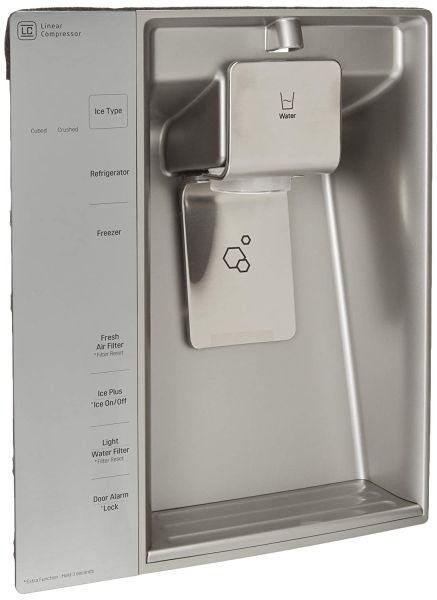
LG ACQ85430256 Refrigerator Display Cover Assembly

Special Price $218.06 Regular Price $281.16
In stock
Available Quantity:   32
SKU
ACQ85430256

Product Description

The LG ACQ85430256 Refrigerator Display Cover Assembly serves as a protective casing of the display to enhance visibility and use of temperature controls and other buttons. Designed to fit and ensure the appliance continues to operate optimally by shielding it from dust, moisture, and other mishaps, it is intended to cover up the control panel of refrigerators that is compatible with it, which aids in the functionality and at the same time does not interfere with the design making it modern.
Manufacturer

https://www.hnkparts.com/media/catalog/product/a/c/acq85430256_lge_hnkparts.png
Manufacturer Name: LGE
Product Number: ACQ85430256
OEM Part Number: ACQ85430256
Product Description: Cover Assy-Display

Choose the best Home Appliance parts and supplies from HnKParts!

  • Same Day Shipping

  • Best Quality And Best Price

  • Wide Range of Inventory

  • Best Customer Service

Have More Questions or Need Help to Place The Order?
Reach us at (866)723-0907 or [email protected]

Write Your Own Review
You're reviewing:LG ACQ85430256 Refrigerator Display Cover Assembly
Your Rating
Customer Questions
What maintenance is required for the LG ACQ85430256 Display Cover Assembly?

Ensure the cover is securely fastened to prevent gaps over the control panel. Clean the surface with a soft, dry cloth to maintain visibility. Inspect for any misalignment and disconnect power before removing the cover for adjustments or inspection.

What are common issues with the LG ACQ85430256 Display Cover Assembly?

  • Controls difficult to read.
  • Cover is shifting out of place.
  • Buttons are partially blocked.
  • Panel is not seating properly.

Installation Steps

Step1: Disconnect the refrigerator from the electrical outlet for safety.

Step2: Locate the display housing on the door and carefully remove the existing cover.

Step3: Check the mounting edges and clear away any dust or residue.

Step4: Align the replacement cover with the guide tabs on the panel.

Step5: Press along the perimeter until it locks securely into place.

Step6: Reconnect power and confirm the display area is properly enclosed and stable.