
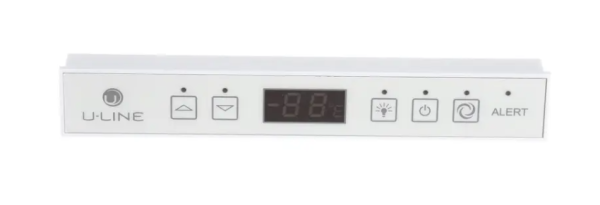
U-Line 80-54510-00 Refrigerator Display Module

$193.91
In stock
Available Quantity:   4
SKU
80-54510-00

Product Description

U-Line 80-54510-00 Display Module offers convenient control and real-time status of the work of the refrigerator. This is an electronic interface that can be used to see and control settings like temperature, mode and system alerts. It functions by taking input signals from the sensors and relaying the information to the control board to show the correct information. This module is vital in having convenient and accurate functionality.
Manufacturer

https://www.hnkparts.com/media/catalog/product/8/0/80-54510-00_u-line_hnkparts.png
Manufacturer Name: U LINE
Product Number: 80-54510-00
OEM Part Number: 80-54510-00
Product Description: Display Module

Choose the best Home Appliance parts and supplies from HnKParts!

  • Same Day Shipping

  • Best Quality And Best Price

  • Wide Range of Inventory

  • Best Customer Service

Have More Questions or Need Help to Place The Order?
Reach us at (866)723-0907 or [email protected]

Write Your Own Review
You're reviewing:U-Line 80-54510-00 Refrigerator Display Module
Your Rating
Customer Questions
What maintenance is required for the U-Line 80-54510-00 Display Module?

Regularly inspect the display module for signs of moisture, loose connections, or physical damage. Keep the control panel clean using a soft, dry cloth to maintain visibility and proper operation. Avoid exposing the module to excessive moisture or harsh cleaning chemicals. Disconnect power before inspecting electrical connections or servicing nearby components.

What are common issues with the U-Line 80-54510-00 Display Module?

  • Blank or unresponsive display screen
  • Incorrect temperature or status readings
  • Intermittent display operation
  • Buttons or touch controls not responding properly
  • Flickering display or missing segments
  • Communication errors between the display module and control board.

Installation Steps

Step1: Disconnect refrigerator power and open control area access panel.

Step2: Carefully unplug wiring harness from the old display module.

Step3: Remove mounting screws or release clips securing the module in place.

Step4: Install the new display module and align it with the control housing.

Step5: Reconnect all wiring firmly, matching original connector positions.

Step6: Refit panel and restore power to test display response and settings.

Step7: Avoid static discharge and ensure connectors are fully seated before powering on.