
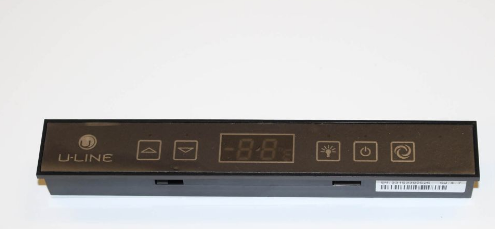
U-LINE 80-54252-00 Refrigerator Display Module

$150.82
In stock
Available Quantity:   4
SKU
80-54252-00
✓ This Product Replaces: 80-54266-00

Product Description

The U-LINE 80-54252-00 Display Module helps in controlling and regulating the temperature of the refrigerator and help in the proper functioning of the refrigeration system. This electronic display module gives information about the temperature and the status of the system and the users can easily set the parameters for better performance. It works by receiving information that is inputted by internal sensors, and it has a control panel that shows information that can be easily observed for proper function.
Manufacturer

https://www.hnkparts.com/media/catalog/product/8/0/80-54252-00_u-line_hnkparts.png
Manufacturer Name: U LINE
Product Number: 80-54252-00
OEM Part Number: 80-54252-00
Product Description: Display Module

Choose the best Home Appliance parts and supplies from HnKParts!

  • Same Day Shipping

  • Best Quality And Best Price

  • Wide Range of Inventory

  • Best Customer Service

Have More Questions or Need Help to Place The Order?
Reach us at (866)723-0907 or [email protected]

Write Your Own Review
You're reviewing:U-LINE 80-54252-00 Refrigerator Display Module
Your Rating
Customer Questions
What maintenance is required for the U-LINE 80-54252-00 Display Module?

Regularly wipe the refrigerator display module with a soft, dry cloth to remove dust and fingerprints. Avoid using liquids or abrasive cleaners. Check connections periodically to ensure proper operation, and handle the module carefully to avoid electrical or physical damage.

What are common issues with the U-LINE 80-54252-00 Display Module?

  • Refrigerator display screen flickering or blank.
  • Buttons or touch controls unresponsive.
  • Error codes appearing incorrectly.
  • Inaccurate temperature readings.

Installation Steps

Step1: Disconnect refrigerator power at breaker to avoid electrical shock.

Step2: Remove display cover panel using proper tool, keep screws safe.

Step3: Disconnect old module wiring harness carefully noting orientation.

Step4: Connect new display module to harness firmly until locked.

Step5: Secure module and reattach cover panel with screws.

Step6: Restore power and test display functions for proper operation.

Step7: Verify display responds correctly and check for error codes.