
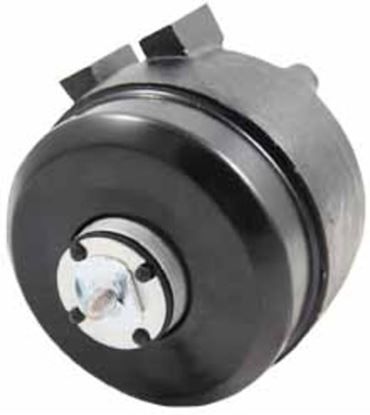
Packard 65111 Refrigerator Fan Motor 2.5 Watt 115 Volt

Special Price $68.28 Regular Price $89.36
In stock
Available Quantity:   11
SKU
65111

Product Description

The Packard 65111 Refrigerator Fan Motor 2.5 Watt 115 Volt pushes the air inside the appliance compartment to ensure even the distribution of temperature. It is attached to the back of the evaporator or the inner wall of the rear and is powered by the electrical system of the appliance by a two-wire power harness and mounting brace. The motor is synchronized with the evaporator fan, thermostat, and control board to control the airflow, avoid frost formation and connect with the cooling cycles. It supports normal refrigerator functioning by ensuring that airflow, temperature and system performance remain unchanged during cooling and defrost periods.
Manufacturer

✓ This Product Replaces: EM5113, UEM1025, EM5111, 4200741, 3150890, 7006413
https://www.hnkparts.com/media/catalog/product/6/5/65111_packard_hnkparts.jpg
Manufacturer Name: PACKARD
Product Number: 65111
OEM Part Number: 65111
Product Description: Packard 2.5 Watt 115 Volt

Choose the best Home Appliance parts and supplies from HnKParts!

  • Same Day Shipping

  • Best Quality And Best Price

  • Wide Range of Inventory

  • Best Customer Service

Have More Questions or Need Help to Place The Order?
Reach us at (866)723-0907 or [email protected]

Write Your Own Review
You're reviewing:Packard 65111 Refrigerator Fan Motor 2.5 Watt 115 Volt
Your Rating
Customer Questions
No Questions

Installation Steps

Step 1: Set Up the Location. The power supply to the condenser fan motor is to be disconnected at the circuit breaker. It is to be confirmed that the power is off prior to commencing the installation procedure.

Step 2: Take Out the Old Motor. The mounting screws and capacitor are to be unscrewed from the existing motor. Next, the wires are to be disconnected from the motor and placed aside.

Step 3: Position the New Motor. The new 65111 Packard Condenser Fan Motor is to be secured to the mounting plate using the supplied screws. The black wire is to be linked to the “L” terminal and the blue wire to the “COM” terminal. The capacitor is to be reconnected to the motor, ensuring that the wiring is accurate.

Step 4: Verify the Motor. Power is to be restored to the motor and it is to be confirmed that it operates correctly. If the motor fails to run, the wiring connections are to be inspected and it is to be ensured that the capacitor is installed correctly.

Step 5: Finalize the Installation. After confirming that the motor operates correctly, the fan housing is to be reattached and secured with the mounting screws. The power to the motor is to be switched off and then turned back on to verify proper functionality.

Please note, these guidelines are to serve as general information and should always be utilized alongside the manufacturer's manual, if available.