
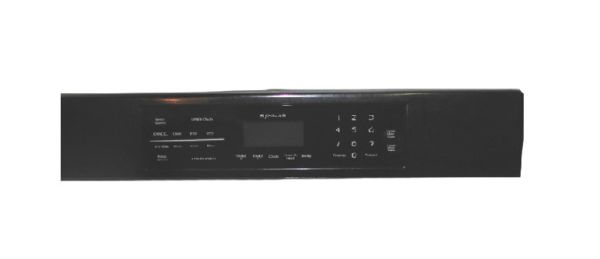
Whirlpool 5765M453-60 Oven Control Panel

Special Price $222.91 Regular Price $320.95
In stock
Available Quantity:   10
SKU
5765M453-60

Product Description

The Whirlpool 5765M453-60 Oven Control Panel provides accurate temperature control and smooth functioning of compatible ovens. It works by taking user inputs via its touchpad or buttons and talking to the appliance’s control board to change settings like temperature, cooking mode, and timer. With intuitive controls and a neat display for enhanced ease of use, its performance delivers inconsistent cooking results. Efficient meal preparation, durable construction, and responsive interface come into operation which makes it a vital part of maintaining the optimal oven functionality.
Manufacturer

✓ This Product Replaces: 74010292, 74008797, 5765M490-60, W10345059
https://www.hnkparts.com/media/catalog/product/5/7/5765m453-60-53925.jpg

This Part Fits the Following Models (2)

Manufacturer Name: WHIRLPOOL
Product Number: 5765M453-60
OEM Part Number: 5765M453-60
Product Description: Panl-Cntrl

Choose the best Home Appliance parts and supplies from HnKParts!

  • Same Day Shipping

  • Best Quality And Best Price

  • Wide Range of Inventory

  • Best Customer Service

Have More Questions or Need Help to Place The Order?
Reach us at (866)723-0907 or [email protected]

Write Your Own Review
You're reviewing:Whirlpool 5765M453-60 Oven Control Panel
Your Rating
Customer Questions
What maintenance is required for the Whirlpool 5765M453-60 Control Panel?

Inspect the panel for secure mounting and check all buttons, knobs, or touch controls for proper response. Clean the surface of spills and residue. Verify wiring connections are tight and that programs execute correctly during operation.

What are common issues with the Whirlpool 5765M453-60 Control Panel?

  • Buttons not responding.
  • Oven programs not executing.
  • Display showing incorrect information.
  • Settings resetting unexpectedly.
  • Inconsistent temperature control.

Installation Steps

Step1: Turn off power supply to the oven.

Step2: Remove mounting screws holding the existing control panel.

Step3: Gently pull the panel forward and disconnect wiring.

Step4: Attach wires to the new control panel accordingly.

Step5: Position the panel and fasten it with screws.

Step6: Turn power back on and confirm display and controls operate properly.