
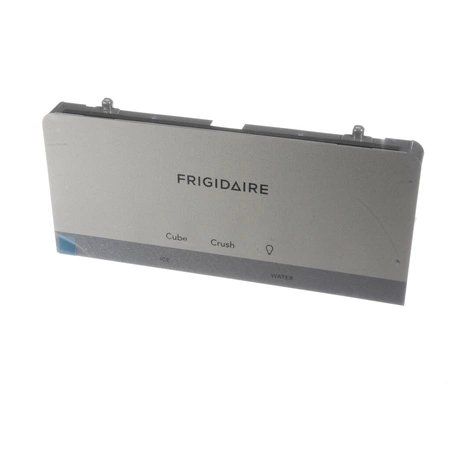
Frigidaire 5304526015 Refrigerator User Interface Assembly Grey

Special Price $68.22 Regular Price $82.95
Out of stock
Available Quantity:   0
SKU
5304526015

Product Description

The Frigidaire 5304526015 User Interface Assembly in grey improves the control and functionality of the refrigerator. It acts as the main interface through which one can control aspects such as temperature, lighting, and modes. It also has a user-friendly interface through which one can readily control the temperatures with a lot of ease. The advantages include better energy use, better functionality, and durability of the appliance, which will provide you with the necessary performance in the kitchen.
Manufacturer

https://www.hnkparts.com/media/catalog/product/5/3/5304526015-96706.jpg
Manufacturer Name: FRIGIDAIRE
Product Number: 5304526015
OEM Part Number: 5304526015
Product Description: User Interface Assembly,Gray

Choose the best Home Appliance parts and supplies from HnKParts!

  • Same Day Shipping

  • Best Quality And Best Price

  • Wide Range of Inventory

  • Best Customer Service

Have More Questions or Need Help to Place The Order?
Reach us at (866)723-0907 or [email protected]

Write Your Own Review
You're reviewing:Frigidaire 5304526015 Refrigerator User Interface Assembly Grey
Your Rating
Customer Questions
What maintenance is required for the Frigidaire 5304526015 User Interface Assembly?

Regularly wipe the Refrigerator User interface with a soft, damp cloth to remove dust and spills, avoiding harsh chemicals. Ensure buttons and display areas remain free from debris to maintain accurate operation. Check connections periodically and handle gently to prevent damage.

What are common issues with the Frigidaire 5304526015 User Interface Assembly?

  • Unresponsive or stuck buttons.
  • Incorrect or fluctuating temperature readings.
  • Display screen flickering or dimming.
  • Failure to control ice or water operations properly.

Installation Steps

Step1: Disconnect refrigerator power supply to prevent electric shock.

Step2: Remove control panel cover and detach faulty interface carefully.

Step3: Disconnect wiring harness and note connector positions.

Step4: Connect new user interface assembly securely to harness.

Step5: Reassemble panel and restore power, test controls.