
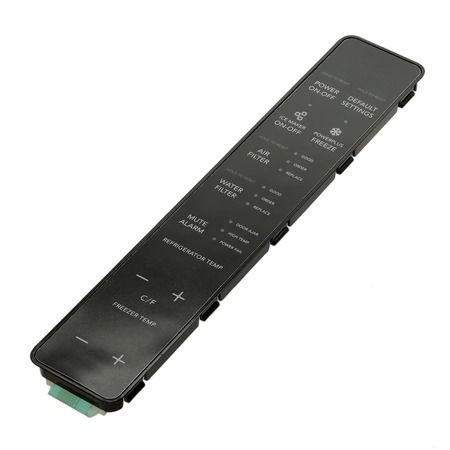
Frigidaire 242048229 Refrigerator User Interface Assembly-Black

Special Price $171.58 Regular Price $216.58
In stock
Available Quantity:   5
SKU
242048229

Product Description

The Frigidaire 242048229 Refrigerator User Interface Assembly – Black is designed to offer full control over the basic cooling functions and maintain the desired temperature. It operates through interfacing with the refrigerator control circuit and enables the direct communication between the user inputs and the refrigerator sub-systems. It takes the shortest time to process commands performing measurements showing appropriate readings and allow changes to any setting easily. This assembly is efficient with a clear digital display for controlling the temperature and energy consumption for proper food storage.
Manufacturer

https://www.hnkparts.com/media/catalog/product/2/4/242048229-62611.jpg
Manufacturer Name: FRIGIDAIRE
Product Number: 242048229
OEM Part Number: 242048229
Product Description: Black User Interface Assy

Choose the best Home Appliance parts and supplies from HnKParts!

  • Same Day Shipping

  • Best Quality And Best Price

  • Wide Range of Inventory

  • Best Customer Service

Have More Questions or Need Help to Place The Order?
Reach us at (866)723-0907 or [email protected]

Write Your Own Review
You're reviewing:Frigidaire 242048229 Refrigerator User Interface Assembly-Black
Your Rating
Customer Questions
What maintenance is required for the Frigidaire 242048229 User Interface Assembly?

Keep the user interface assembly clean by wiping the control panel with a soft, slightly damp cloth and avoiding abrasive cleaners. Inspect the panel area for moisture intrusion or damaged wiring connections. Ensure buttons and display functions operate correctly during routine refrigerator checks. Always disconnect power before inspecting electrical components.

What are common issues with the Frigidaire 242048229 User Interface Assembly?

  • Unresponsive or erratic touch controls.
  • Faded, dim, or blank display screen of refrigerator.
  • Incorrect temperature settings or readings .
  • Failure to register user inputs or commands.

Installation Steps

Step1: Unplug refrigerator before starting to prevent electrical shock and disconnect power source completely.

Step2: Remove control panel cover using proper tool and set screws aside.

Step3: Disconnect old user interface harness safely, noting wire orientation and connectors.

Step4: Connect new user interface assembly firmly, matching all connectors properly.

Step5: Reinstall cover, secure screws, restore power, and test all buttons.