The store will not work correctly in the case when cookies are disabled.
We collect user information to provide a better user experience and protect the security of our website. By continuing to use our website, you acknowledge the use of cookies.
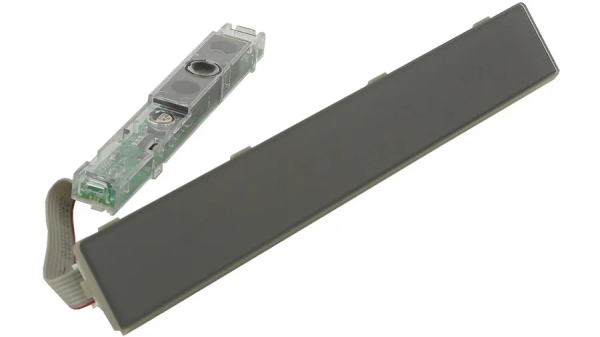
The Bosch 12024239 Refrigerator Display Module with Dispenser Touchpad allows to get full control of the fridge’s settings. This electronic component allows the control of temperature, functions, and water and ice dispenser through a touch. This is achieved by accepting inputs from the user through a touch panel and forwarding the commands to the refrigerator control board for accurate control.
Provides the user-facing display and touch-control interface for applicable refrigerator dispenser functions. The BOSCH 12024239 Refrigerator Display Module combines display and touch-pad components within a single electronic assembly positioned at the refrigerator's dispenser area. It forms part of the appliance's electronic user-interface system.
Touch Input and Command Processing:
Processes touch selections through the module's touch-sensitive interface, allowing user inputs to be converted into corresponding electrical signals. These signals are communicated to the refrigerator's control system as electronic commands for further processing.
Display Interface Operation:
Provides the visual interface through which applicable refrigerator information and control selections are presented to the user. The display operates as part of the integrated electronic interface assembly alongside the touch-control section.
Replacement Guidelines:
Replacing the Refrigerator Display Module if it is damaged, malfunctioning, excessively worn, or otherwise deteriorated. The part number 12024239 should be verified before replacement to ensure the correct display module is selected. Replace the module if deterioration affects display operation, touch input, command communication, or normal dispenser-interface operation.
Common Failure Symptoms:
Display not illuminating properly.
Touch selections not responding.
Certain interface functions becoming unavailable.
Incorrect or distorted display information.
Inconsistent touch-control response.
Equipment Compatibility:
Verify that BOSCH part number 12024239 matches the equipment documentation before purchasing. Confirm the applicable refrigerator configuration, display module specifications, and manufacturer parts information. The complete refrigerator model number should be matched with part number 12024239 to confirm the intended application.
What maintenance is required for the Bosch 12024239 Display Module?
Periodically wipe the display with a soft, dry cloth to prevent dust or smudges from affecting readability. Check for loose connectors behind the panel and ensure buttons respond correctly. Avoid exposing the module to moisture or harsh cleaners that can interfere with operation.
What are common issues with the Bosch 12024239 Display Module?
Display not illuminating consistently.
Buttons not responding to input.
Error codes appearing unexpectedly.
Settings failing to update properly.
What is Bosch 12024239 used for?
It provides the display and touch-control interface for applicable refrigerator dispenser functions.
What does the 12024239 touch pad do?
It detects user touch selections and converts them into electronic input signals for the refrigerator's control system.
Does 12024239 include both a display and touch pad?
Yes. The module combines display and dispenser touch-control components in one assembly.
What does the Bosch 12024239 display module control?
It provides the electronic display and touch-input interface for applicable refrigerator dispenser functions.
When should the Bosch 12024239 Refrigerator Display Module be replaced?
The display module may require replacement when the display is damaged, unresponsive, malfunctioning, or no longer communicates properly with the compatible refrigerator control system.
Installation Steps
Step1: Disconnect power to the refrigerator before servicing.
Step2: Carefully remove the control panel cover to access the display module.
Step3: Disconnect the wiring harness from the old module.
Step4: Release mounting clips or screws and remove the display.
Step5: Install the new module and reconnect the wiring harness.
Step6: Restore power and verify the display functions and responds to inputs.