
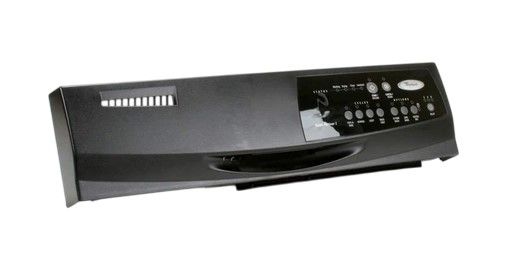
Whirlpool WPW10021710 Dishwasher Control Panel With Touchpad

Special Price $132.72 Regular Price $147.95
In stock
Available Quantity:   28
SKU
WPW10021710

Product Description

The Whirlpool WPW10021710 Dishwasher Control Panel is used to operate by allowing users to choose washing cycles, set preferences, and observe the status of the washing process. When the required settings are selected, the panel gives signals to the motor and pump of the dishwasher to start washing, draining and drying cycles. This control panel also provides an easy interface to the user with feedback on each of the selected functions. It contribute to the decrease of cycle time, energy consumption and increase of the dishwasher’s durability, making it suitable for everyday use.
Manufacturer

✓ This Product Replaces: W10021710
https://www.hnkparts.com/media/catalog/product/w/p/wpw10021710-89290.jpg
Manufacturer Name: WHIRLPOOL
Product Number: WPW10021710
OEM Part Number: WPW10021710
Product Description: Panel-Cntl

Choose the best Home Appliance parts and supplies from HnKParts!

  • Same Day Shipping

  • Best Quality And Best Price

  • Wide Range of Inventory

  • Best Customer Service

Have More Questions or Need Help to Place The Order?
Reach us at (866)723-0907 or [email protected]

Write Your Own Review
You're reviewing:Whirlpool WPW10021710 Dishwasher Control Panel With Touchpad
Your Rating
Customer Questions
What maintenance is required for the Whirlpool WPW10021710 Control Panel With Touchpad?

Regularly wipe the dishwasher control panel with a soft, damp cloth to remove grease and residue. Avoid abrasive cleaners that can damage the touchpad. Check buttons for responsiveness and ensure no moisture seeps inside.

What are common issues with the Whirlpool WPW10021710 Control Panel With Touchpad?

  • Unresponsive touchpad buttons.
  • Erratic cycle selections or incorrect displays.
  • Control panel freezing or locking up.
  • Error codes appearing unexpectedly.

Installation Steps

Step1: Disconnect Dishwasher power at the breaker to avoid electrical shock.

Step2: Open the dishwasher door and remove inner door screws.

Step3: Separate the inner and outer door panels carefully.

Step4: Disconnect the wire harness from the old control panel.

Step5: Align and secure the new control panel in place.

Step6: Reconnect the harness, reassemble the door, and restore power.