
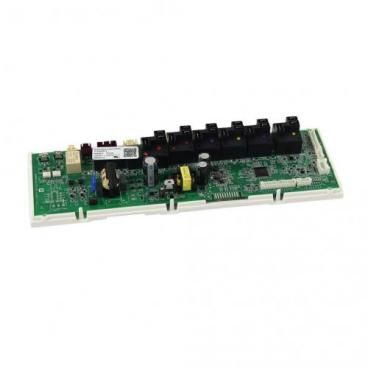
General Electric WB27X36809 Range Control Flashed RC17

Special Price $162.74 Regular Price $198.11
In stock
Available Quantity:   2
SKU
WB27X36809
✓ This Product Replaces: WB27X33654

Product Description

The General Electric WB27X36809 Range Control Flashed RC17 provides the ability to regulate the temperature and time to the same cooking outcome. It can fit in the GE range control panels that are compatible with the module, and it regulates the heating cycles of the oven and the user inputs to ensure that the oven stays at its better and to ensure that the appliance is more sturdy and to keep the appliance running well.
Manufacturer

https://www.hnkparts.com/media/catalog/product/w/b/wb27x36809_general-electric_hnkparts.png

This Part Fits the Following Models (6)

Manufacturer Name: GENERAL ELECTRIC
Product Number: WB27X36809
OEM Part Number: WB27X36809
Product Description: Control Rc17(Flashed)

Choose the best Home Appliance parts and supplies from HnKParts!

  • Same Day Shipping

  • Best Quality And Best Price

  • Wide Range of Inventory

  • Best Customer Service

Have More Questions or Need Help to Place The Order?
Reach us at (866)723-0907 or [email protected]

Write Your Own Review
You're reviewing:General Electric WB27X36809 Range Control Flashed RC17
Your Rating
Customer Questions
What maintenance is required for the General Electric WB27X36809 Control Flashed?

Regularly inspect the range control panel for dust, grease buildup, or loose connections, and gently clean with a dry or slightly damp cloth. Ensure the unit is powered off before any cleaning to avoid electrical hazards. Check wiring connections periodically to maintain stable performance and prevent intermittent faults. Avoid exposure to moisture or heat to preserve accurate operation.

What are common issues with the General Electric WB27X36809 Control Flashed?

  • Unresponsive or intermittently functioning control panel.
  • Display errors or flashing indicators.
  • Buttons failing to register input.
  • Communication errors with other range components.
  • Power fluctuations causing reset or malfunction.

Installation Steps

Step1: Disconnect power at range from electrical panel to avoid electric shock risks.

Step2: Remove the range back panel screws and access control compartment area.

Step3: Label and disconnect wiring harness from old control board carefully.

Step4: Install new control board and reconnect wiring harness securely.

Step5: Secure mounting screws and ensure proper fit alignment; avoid pinched wires.

Step6: Restore power and test all functions carefully before normal use.