
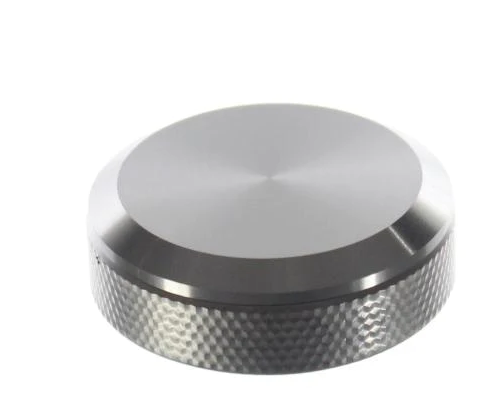
Samsung DG94-01481A Cooktop Element Control Knob

Special Price $161.21 Regular Price $209.54
In stock
Available Quantity:   22
SKU
DG94-01481A

Product Description

The Samsung DG94-01481A Cooktop Element Control-Knob is a convenient and simple-to-use knob that provides better control over the heating elements of the stove. This robust knob may replace the current knob on the stove and is simple to assemble. It operates through a secure clamping mechanism that enables the users to rotate the knob to change the temperature settings on the cooktop.

Knobs, Stove Knobs,
Manufacturer
https://www.hnkparts.com/media/catalog/product/d/g/dg94-01481a_smg_hnkparts.png
Manufacturer Name: Samsung
Product Number: DG94-01481A
OEM Part Number: DG94-01481A
Product Description: Cooktop Element Control-Knob

Choose the best Home Appliance parts and supplies from HnKParts!

  • Same Day Shipping

  • Best Quality And Best Price

  • Wide Range of Inventory

  • Best Customer Service

Have More Questions or Need Help to Place The Order?
Reach us at (866)723-0907 or [email protected]


Write Your Own Review
You're reviewing:Samsung DG94-01481A Cooktop Element Control Knob
Your Rating
Customer Questions
What maintenance is required for the Samsung DG94-01481A Element Control Knob?

Turn the knob through its full range periodically to confirm smooth movement. Ensure the knob aligns correctly with the control shaft. Remove grease buildup around the base area, and allow the cooktop to cool fully before performing adjustments.

What are common issues with the Samsung DG94-01481A Element Control Knob?

  • Knob not turning smoothly.
  • Heat level not adjusting correctly.
  • Control position misreading settings.
  • Markings fading with regular use.

Installation Steps

Step1: Ensure the cooktop is off and cool before handling.

Step2: Grip the existing knob and pull it straight outward.

Step3: Align the new knob with the control shaft.

Step4: Press it firmly until it seats properly.

Step5: Rotate it gently to confirm smooth engagement.

Step6: Check markings align correctly with control settings.
