
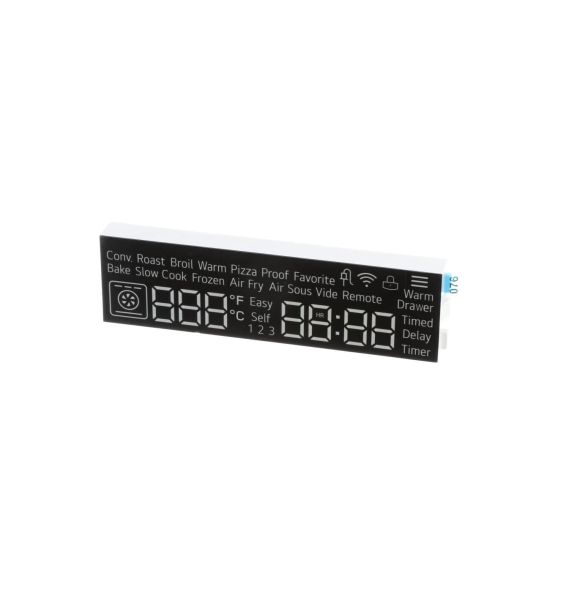
LG EAV64012007 Range LED Display Module

Special Price $80.79 Regular Price $100.02
Out of stock
Available Quantity:   0
SKU
EAV64012007

Product Description

The LG EAV64012007 LED Display-Module is a digital display that ensures that the cooking range shows clear and bright numbers. This makes it possible to display the correct temperature, timer settings, and other functions that make the experience better and operates by connecting to the range’s control board and receives signals to light up specific information to monitor and control conveniently and has longevity performance with LED technology.
Manufacturer

https://www.hnkparts.com/media/catalog/product/e/a/eav64012007-99951.jpg
Manufacturer Name: LGE
Product Number: EAV64012007
OEM Part Number: EAV64012007
Product Description: Led-Display Module

Choose the best Home Appliance parts and supplies from HnKParts!

  • Same Day Shipping

  • Best Quality And Best Price

  • Wide Range of Inventory

  • Best Customer Service

Have More Questions or Need Help to Place The Order?
Reach us at (866)723-0907 or [email protected]

Write Your Own Review
You're reviewing:LG EAV64012007 Range LED Display Module
Your Rating
Customer Questions
What maintenance is required for the LG EAV64012007 LED Display Module?

Observe brightness and clarity of displayed information during operation. Ensure the module remains firmly seated in its housing. Check the connector activation behind the panel, and disconnect the appliance from power before inspecting the display circuitry.

What are common issues with the LG EAV64012007 LED Display Module?

  • Display not illuminating.
  • Numbers appear incomplete.
  • Brightness is fluctuating unexpectedly.
  • Settings are not showing correctly.

Installation Steps

Step1: Unplug the range to prevent electrical hazards.

Step2: Open the control panel by removing screws or clips.

Step3: Carefully disconnect all wiring connectors from the old LED display module.

Step4: Remove the module from its mounting bracket.

Step5: Install the new display module and secure it in place.

Step6: Reconnect wires, close the panel, restore power, and test all functions.