
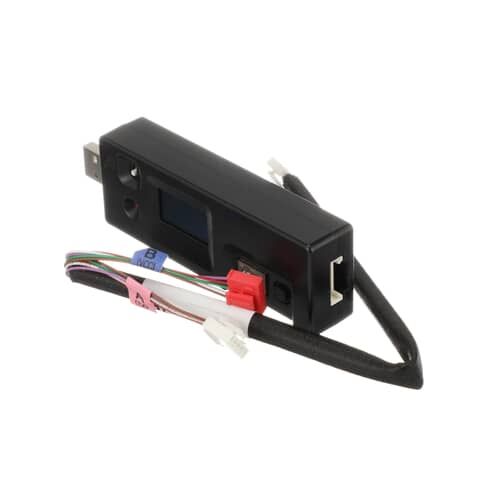
LG CJT30000002 Refrigerator Software Update Module Kit

Special Price $98.63 Regular Price $130.45
In stock
Available Quantity:   146
SKU
CJT30000002

Product Description

The LG CJT30000002 Software Update Module Kit works by updating the firmware of the refrigerator, and used by connecting the module to the update port of the appliance that is intended for it also can detect firmware and install the most current version of it. After that, the update is done and the system restarts, adding new features, better diagnostics, and efficiency. This makes sure that the refrigerator cools at the right temperature as required without being too much or too little.
Manufacturer

✓ This Product Replaces: CJT30000001
Manufacturer Name: LGE
Product Number: CJT30000002
OEM Part Number: CJT30000002
Product Description: Jig Update Tool

Choose the best Home Appliance parts and supplies from HnKParts!

  • Same Day Shipping

  • Best Quality And Best Price

  • Wide Range of Inventory

  • Best Customer Service

Have More Questions or Need Help to Place The Order?
Reach us at (866)723-0907 or [email protected]

Write Your Own Review
You're reviewing:LG CJT30000002 Refrigerator Software Update Module Kit
Your Rating
Customer Questions
What maintenance is required for the LG CJT30000002 Software Update Module Kit?

Ensure the refrigerator’s firmware is kept current by installing updates according to manufacturer instructions to maintain performance and fix known bugs. Avoid interrupting the update process to prevent corruption. Back up settings if the system supports this feature before applying updates. Disconnect power only if instructed by update prompts.

What are common issues with the LG CJT30000002 Software Update Module Kit?

  • Update fails to install.
  • Control panel unresponsive during update.
  • Error codes appear unexpectedly.
  • Settings do not save correctly.

Installation Steps

Step 1: All required tools and materials will be collected. A Phillips head screwdriver, a flat-blade screwdriver, a replacement LG CJT30000002 SW Rewriter Assembly, and safety glasses will be needed.

Step 2: Your computer will be disconnected from the power source and all cables will be detached from it.

Step 3: The cover of the LG CD/DVD drive will be removed. This can be accomplished by loosening the screws situated on the side of the drive.

Step 4: The flat-blade screwdriver will be employed to gently extract the circuit board and the LG CJT30000002 SW Rewriter Assembly will be removed.

Step 5: The new LG CJT30000002 SW Rewriter Assembly will be inserted into the computer and it will be fastened using screws.

Step 6: Your computer will be reconnected, all cables will be reattached, and the cover will be put back on the drive.

Step 7: The drive will be verified to ensure it is functioning correctly.

Congratulations! The LG CJT30000002 SW Rewriter Assembly has been successfully replaced.

Please note, these instructions are served as general advice and should always be utilized alongside the manufacturer's manual, if one is available.